
Ideas for better growth
How to Build a Careers Page With a Job Board
Chris Content · · 5 min read
Turn a neglected careers page into a hiring channel: listings that filter properly, honest descriptions, salary transparency, and an application path that works.
Most careers pages are a stock photo, a paragraph about culture, and an email address. They generate either nothing or a flood of irrelevant applications, and both outcomes waste the hiring manager's time.
A careers page is a landing page with a conversion goal. This guide covers how to build one that attracts the right people and filters out the rest before anyone reads a CV.
Step 1: Write listings candidates can self-select against
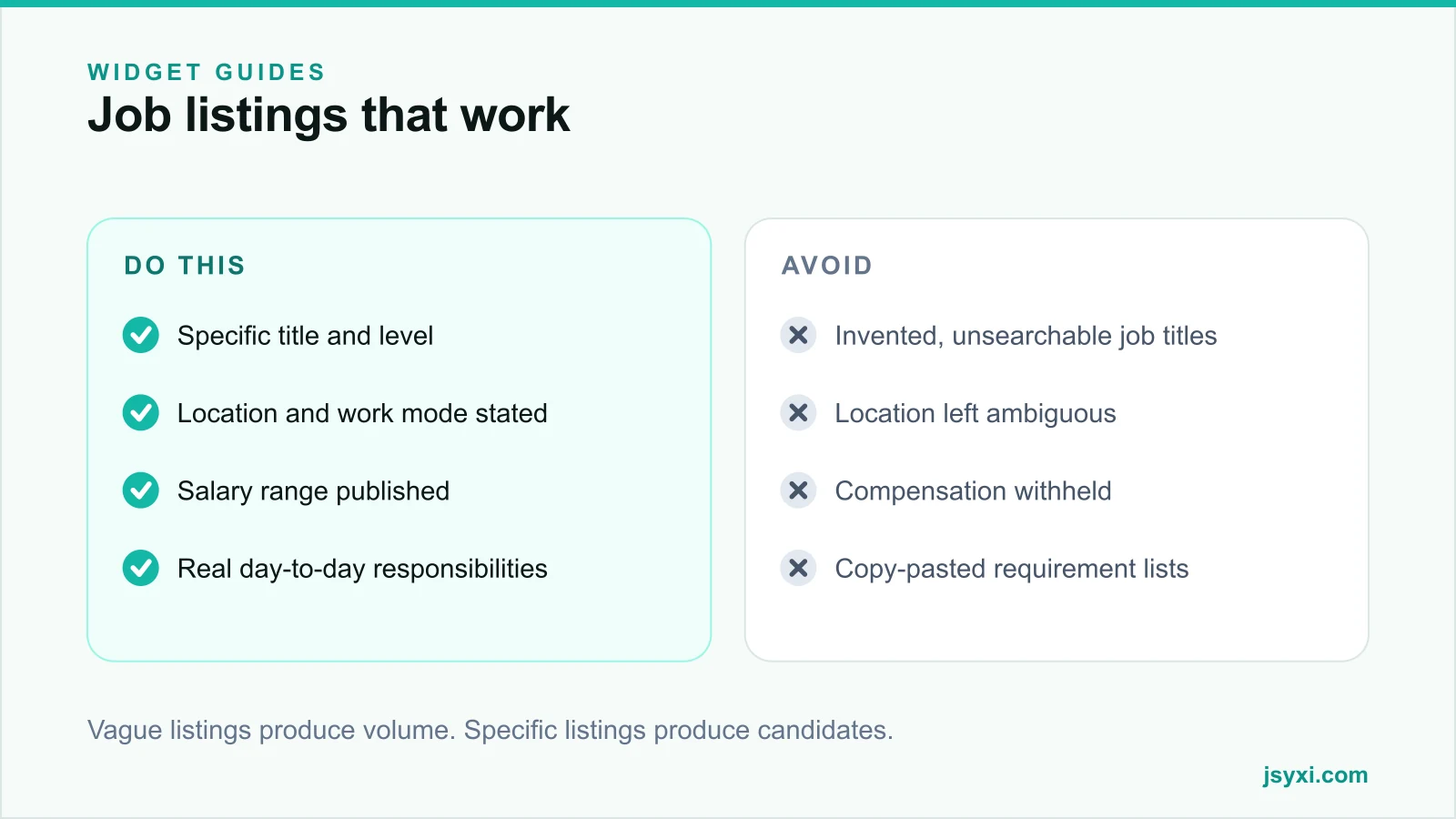
The job of a listing is to help the right person say yes and the wrong person say no, quickly. Every listing needs:
- A standard job title. People search for "Backend Developer", not "Code Wizard". Non-standard titles are invisible in search.
- Level. Junior, mid, senior, or lead. Ambiguity wastes everyone's time.
- Location and work mode. On-site, hybrid with days specified, or remote with timezone expectations.
- Employment type. Full-time, contract, internship.
- Compensation range. The single strongest filter you can publish.
- The actual work. What this person will do in their first ninety days.
- Genuine requirements. Separate must-have from nice-to-have and be honest about which is which.
A ten-item requirement list copied from a template does not describe a job. Three real requirements do.
Step 2: Publish salary ranges
Withholding compensation is the most expensive habit in hiring. It produces applications from people you cannot afford and from people you would underpay, and both discover the mismatch after several rounds of interviews.
Publishing a range:
- Filters out mismatches before anyone invests time
- Signals that you negotiate honestly
- Increases applications from experienced candidates who refuse to apply blind
- Reduces offer-stage dropouts
If you genuinely cannot publish a number, publish the band and what moves a candidate within it.
Step 3: Build the board without a developer
The Job Board widget lets you list open roles with filters and apply links, and embed the board on your careers page with one line.
Configure:
- Filters that match how candidates search - department, location, work mode, type
- A visible count of open roles
- A consistent listing layout so roles are comparable at a glance
- A clear apply action per role, not one shared email address
- An honest empty state when nothing is open, with a route to register interest
Place it with the embed snippet guide. Because listings live in your workspace, closing a filled role takes seconds - and a stale listing is the fastest way to annoy candidates.
Step 4: Make the application path short and honest
The application step loses more good candidates than the listing does:
- Ask for a CV and one contact route. Nothing else is required to start a conversation.
- Never make a candidate retype their entire CV into a form.
- If you need a portfolio or code sample, ask for a link, not an upload.
- State how long the process takes and how many stages there are.
- Confirm receipt immediately, and say when they will hear back.
If you promise a response by a date, respond by that date - including to the people you reject. Candidate experience is public now, and silence is the most-cited complaint.
Use the Form Builder widget so applications land in a tracked queue with the role as the source, rather than in a shared inbox.
Step 5: Show what the company is actually like
Culture copy is worthless when it is generic. Replace adjectives with evidence:
- A Team Showcase with real people, roles, and how long they have been there
- A Timeline of company milestones
- Specific benefits with specific terms - leave policy, working hours, equipment, learning budget
- Honest description of the working pattern, including on-call or shift expectations
- Photographs of the actual office, not stock imagery
Candidates screen employers as carefully as employers screen candidates. Specifics are what they screen on.
Step 6: Get the page found
A careers page can rank, and job listings can appear in search:
- Give each role its own URL rather than a single page with a modal
- Use the standard title in the page title and heading
- Include location in the title where it matters
- Keep listings live and marked closed rather than deleted, so links survive
- Mark up listings with job posting structured data if your platform supports it - see our schema markup guide
Common mistakes to avoid
- Listings with no location. Remote-or-not is the first thing every candidate checks.
- Roles left open after filling. It wastes candidate time and damages your reputation.
- Applications to a generic email. They get lost and nobody owns them.
- A wall of requirements. Long lists deter exactly the candidates who would have grown into the role.
- No response to rejected applicants. A two-line message costs nothing and is remembered.
Frequently asked questions
Should we publish salary ranges on job listings?
Yes. It filters mismatches early, increases applications from experienced candidates, and reduces offer-stage dropouts. If you cannot publish a precise number, publish a band and explain what moves a candidate within it.
How long should a job description be?
Long enough to describe the actual work and honest requirements - usually 300 to 600 words. Beyond that you are writing a contract, not an advertisement.
Should each job have its own page?
Yes. Separate URLs can be shared, bookmarked, indexed, and tracked individually, and they let you see which roles attract traffic and which do not.
What should the careers page show when nothing is open?
Say so plainly and offer a way to register interest for future roles. An empty board with no explanation reads as a broken page.
Next steps
Rewrite your open roles with a standard title, location, work mode, and salary range, then publish them with the Job Board widget. Add a Team Showcase so candidates can see who they would work with, and commit to a response deadline you will actually meet.
Start free and build a careers page that earns applications.