
Ideas for better growth
How to Show Business Hours on Your Website
Chris Content · · 5 min read
Publish opening hours that stay accurate, show a live open or closed status, and handle holidays, so customers stop arriving at a closed shutter.
Opening hours look like the most boring content on a website until you consider what wrong hours cost: a customer who travelled across town to a closed shutter, a support call that should never have happened, and a one-star review that mentions none of your actual products.
This guide covers how to publish hours that stay true, show a live status, and handle the exceptions that break most implementations.
Why static hours fail
Most sites publish hours once, as a block of text or an image in the footer, and never touch them again. That fails for predictable reasons:
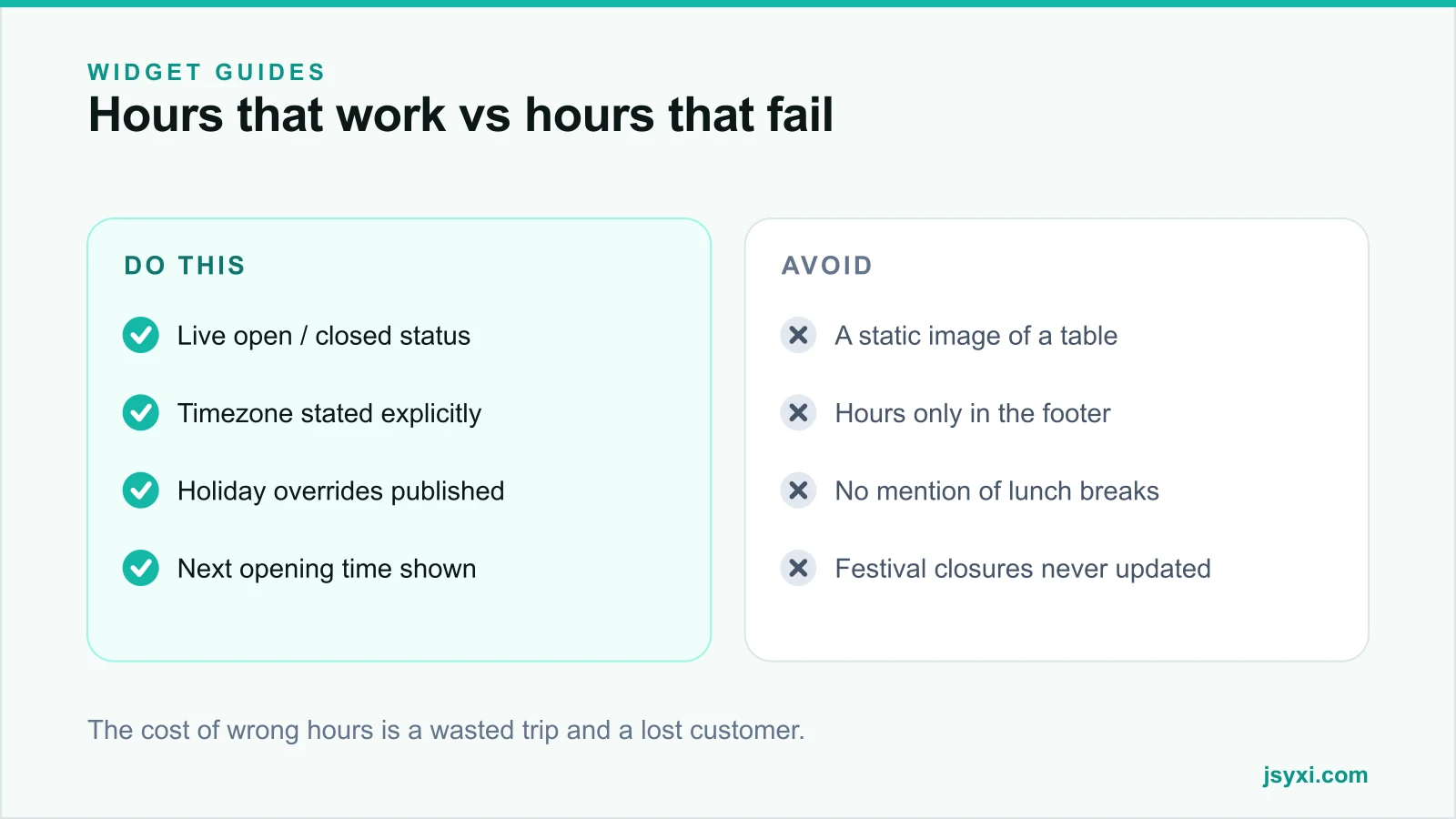
- Festival and public-holiday closures are never added
- Seasonal timings change but the page does not
- Lunch breaks and weekly offs are omitted
- The visitor has no idea whether you are open right now
- Nothing states the timezone, which matters for online services
Every one of those gaps turns into a phone call, a message, or a wasted trip.
Step 1: Write down the real schedule
Before touching the website, write the actual operating schedule, including the parts you usually leave implicit:
- Regular hours per day of the week, including any weekly off
- Mid-day breaks, if the counter genuinely closes
- Last order or last entry time, if it differs from closing
- Public holidays and festival closures for the next twelve months
- Separate schedules for different functions, such as showroom, service desk, and phone support
If your phone support runs longer than your showroom, publish both. One combined set of hours will disappoint whichever group is wrong.
Step 2: Show a live open or closed status
A table of hours makes the visitor do arithmetic. A live status answers the question they actually have.
The Business Hours widget shows a current open or closed state alongside the weekly schedule, so a visitor sees "Open now, closes at 8:00 PM" or "Closed, opens tomorrow at 10:00 AM" without reading the table at all.
Three details make this work:
- State the timezone. For a local shop it is obvious; for an online service or support desk it is not. Say "IST" explicitly.
- Show the next transition. Closing time when open, next opening time when closed. That single line prevents most "are you open?" messages.
- Handle the edge minutes honestly. If you stop taking walk-ins fifteen minutes before closing, say so rather than showing "open" until the last second.
Step 3: Publish holiday overrides in advance
Exceptions are where hours go wrong. Add overrides for:
- National and state public holidays
- Festival closures, which vary by region and by year
- Annual maintenance or stock-taking shutdowns
- Half-days and special event timings
Set them a quarter ahead, not the night before. A customer planning a Saturday visit checks on Thursday.
If you run several branches with different regional holidays, keep a separate schedule per location and surface it on that location's page or through your Store Locator.
Step 4: Put the hours where the decision happens
Hours in the footer are a reference. Hours next to a decision are useful. Place them:
- On the contact page, beside the address and the map
- On each location page for multi-branch businesses
- Near a "Call us" or "Visit us" call to action
- Beside a booking or appointment form
- In an announcement bar when today's timing is unusual
For a restaurant, hours beside the menu answer "can I order now?" at exactly the right moment.
Step 5: Keep the rest of the web in sync
Your website is not the only place people check. Update the same schedule in:
- Your Google Business Profile, including special hours for holidays
- Marketplace and delivery-platform listings
- Social profiles that display hours
- Any directory or aggregator listing you control
Conflicting hours across sources look careless and, for local search, weaken the consistency signals that help you rank. The Google Business Profile checklist covers that side in detail.
Step 6: Say what happens when you are closed
Closed is not the end of the conversation. A good closed state offers a next step:
- A WhatsApp chat route with an honest response-time expectation
- A contact form that promises a reply on the next working day
- An online ordering or booking link that works around the clock
- The next opening time, stated plainly
That turns a dead end into a captured lead. Our guide on speed to lead explains why the follow-up window matters more than most teams assume.
Common mistakes to avoid
- Publishing hours as an image. It cannot be read by assistive technology, translated, or updated quickly.
- Omitting the weekly off. Visitors assume seven days unless told otherwise.
- Ignoring timezone for online services. "9 to 6" means nothing to a customer two zones away.
- Letting the widget drift from reality. Assign one owner and review it monthly.
- Different hours on different pages. Publish once and embed everywhere.
Frequently asked questions
Should opening hours be in the footer or on the contact page?
Both. The footer is the reference location people look for by habit; the contact page is where the visit decision happens. Publish once through a widget and embed it in both places so they can never disagree.
How do I handle festival and holiday closures?
Add dated overrides a quarter in advance and update your Google Business Profile special hours at the same time. Announce unusual timings for the current week in an announcement bar so returning visitors see them without hunting.
What should the site show when we are closed?
The next opening time plus at least one asynchronous route - a form, a chat handoff, or online booking - with an honest expectation of when the customer will hear back.
Do business hours affect local SEO?
Indirectly but meaningfully. Consistent, accurate hours across your website, Google Business Profile, and directory listings strengthen the trust signals local ranking depends on, and accurate hours reduce negative reviews caused by wasted trips.
Next steps
Write out your real schedule including breaks and holidays, publish it with the Business Hours widget, and mirror it on your Google Business Profile. Then add a closed-state route so out-of-hours visitors still become leads.
Start free and publish accurate hours in ten minutes.